 Journaly
Try the free Android beta
A cTrader trading journal that reads your history screenshot.
Send Journaly one screenshot of your cTrader trade history and it reads up to 30 closed trades, adds them up, and saves them all when you tap once. Journaly never asks for your cTrader login; it reads only the screenshot you send.
You, to Journaly
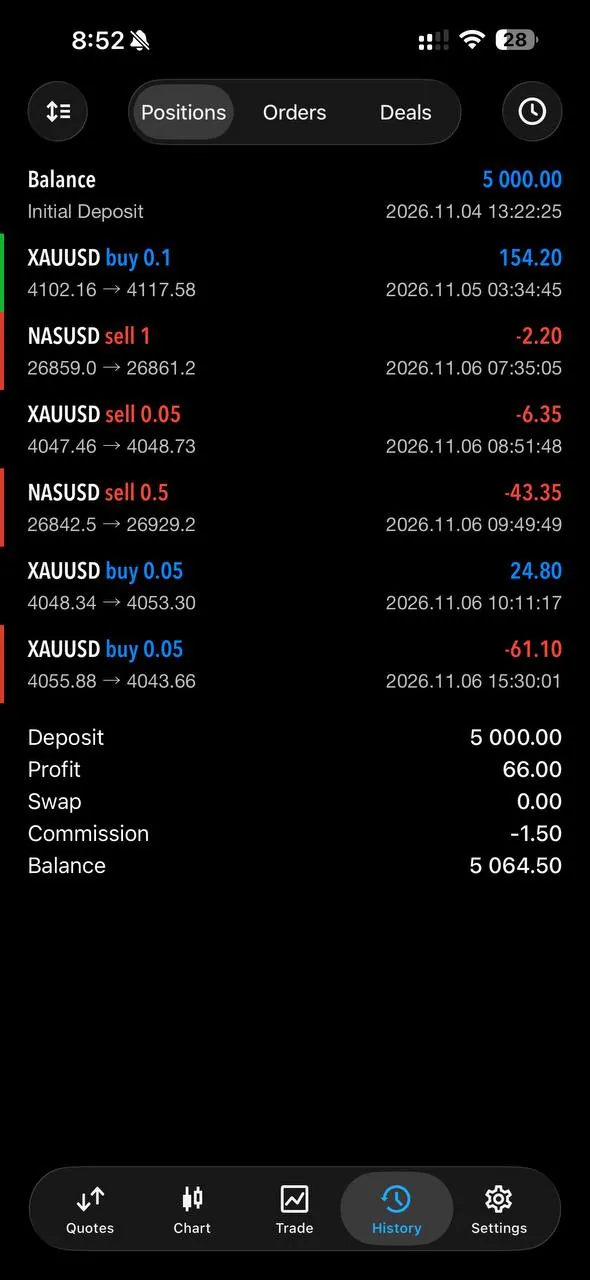 One screenshot of your MT5 history
Journaly
- Read 6 closed trades and ticked them all
- Added them up: +$66 across the 6 trades
- Saved all 6 with one tap on Log 6 trades
Screen recording from the app. Up to 30 trades per screenshot from MT4, MT5 or cTrader; trades you already logged are flagged so they’re never saved twice.
How it works
- Add your account in Journaly and pick cTrader as its platform.
- Open your closed trades in cTrader and take a screenshot.
- Send the screenshot to Journaly in the chat.
- Journaly lists every trade it read with its P&L, ticks them all, and adds them up.
- Tap Log trades to save them. Trades you already logged are flagged, so nothing is saved twice.
The recording above uses an MT5 screenshot; a cTrader history screenshot goes through the same steps, as on the MT5 trading journal page.
What it doesn’t do
Journaly doesn’t connect to cTrader or your broker, and it doesn’t import cTrader statements or CSV files yet. For a single trade, it is often quicker to say it out loud.
Prefer a spreadsheet for now? Use the free trading journal template.
Questions.
Journaly
Does Journaly work with cTrader?
Yes, by screenshot. Send a screenshot of your cTrader trade history and Journaly reads up to 30 closed trades from it. Nothing is saved until you confirm.
Do I need to give Journaly my cTrader login?
No. Journaly does not ask for broker or prop firm logins; it reads only the screenshot you send.
Can I import a cTrader statement or CSV?
Not yet. Log trades by screenshot, voice or typing, with no broker login needed.
What if the screenshot includes trades I already logged?
Journaly marks trades you already logged so they are not saved twice.
Is it free?
Yes, with daily limits. The free plan includes one trading account and daily limits on voice notes, screenshot reads, AI messages and trade logs. Journaly Pro raises the limits for $6.99 a week, $19.99 a month or $119.99 a year (monthly and yearly with a 3-day free trial); store prices can vary by country.
More guides.
- Voice trading journalSay the trade out loud; Journaly fills in the entry.
- MT5 trading journalOne history screenshot logs up to 30 closed trades.
- Prop firm payout trackerPayouts next to challenge fees, resets and subscriptions.
- Prop firm challenge calculatorFree: did your challenges pay off?
- Prop firm challenge simulatorFree: your odds of passing, from 10,000 simulated attempts.
- Trading journal templateFree CSV with the columns Journaly records per trade.

Try Journaly on Android today.
The beta is free on Google Play. Three taps, with the Google account you use on your phone:
- Join the Journaly testers group (tap “Join group”)
- Become a tester (tap “Become a tester”)
- Install Journaly from Google Play
Something wrong or missing? Post it on the Feedback board in Profile. Beta testers shape what ships at launch.
On iPhone? Be first in line.
Journaly is on Android now and the App Store is next. Leave your email for the iPhone beta and launch day.